Microsoft Copilot 2026: What’s New, What It Costs & What SMBs Need to Know
Microsoft Copilot 2026: What’s New, What It Costs & What SMBs Need to Know
Microsoft Copilot is evolving beyond an AI assistant. Here’s what’s changing in 2026, what Copilot costs, and what small and midsize businesses should know before getting started.
What’s New in Microsoft Copilot?
Microsoft Copilot is changing quickly.
What started as an AI assistant for everyday tasks like drafting emails, summarizing meetings, and creating content is becoming a more personalized and capable part of the Microsoft 365 experience.
For small and midsize businesses, that creates an important question:
What’s actually new with Microsoft Copilot in 2026, and what does it mean for my business?
Three changes stand out.
1. Copilot Is Becoming More Aware of Your Business
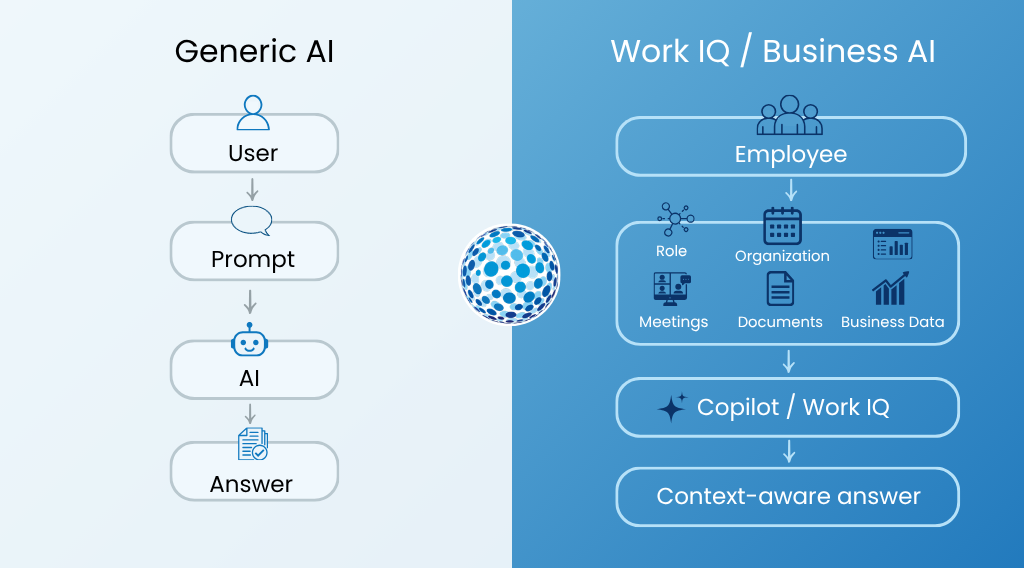
One of Microsoft’s biggest developments is Work IQ, an intelligence layer designed to give Copilot more context about an employee and their organization.
Instead of treating every interaction as an isolated prompt, Copilot can use signals from work patterns, organizational information, Microsoft 365 activity, and business data to provide more relevant experiences.
Think about the difference between asking a general AI tool:
“Help me prepare for my customer meeting.”
and having an AI assistant that understands your role, your organization, the work you’ve already done, and the information you use every day.
That business context can make AI much more useful.
Microsoft describes Work IQ as bringing together things like context, data, memory, skills, and tools to personalize Copilot and help it better understand how work gets done.
Generic AI gives you an answer. Business AI can give you an answer grounded in the context of your work.
2. Copilot Is Becoming More Personalized
AI works best when it can adapt to the person using it.
Microsoft is continuing to build Copilot around the idea that an employee’s work isn’t generic. Their responsibilities, preferences, workflows, and information are different from everyone else’s.
The more context Copilot has, the more useful it can become for specific roles and tasks.
For an SMB, that could mean an AI experience that feels less like a separate tool employees have to learn and more like an assistant integrated into the work they already do.
3. Microsoft Is Expanding AI Model Choice
Another change is Microsoft’s growing multi-model approach.
Microsoft 365 Copilot is expanding access to models from providers including OpenAI and Anthropic, giving Microsoft more flexibility in how different AI capabilities can be used across Copilot experiences.
The takeaway for businesses isn’t necessarily which model is “best.”
It’s that AI is becoming more flexible, and Microsoft is building an ecosystem where different models can be used for different types of work.
What Can Microsoft Copilot Actually Do for an SMB?
The easiest way to understand Copilot is to look at the work it can help employees accomplish.
Productivity
Copilot can help employees:
- Draft and refine emails
- Summarize meetings and conversations
- Create and edit documents
- Analyze information
- Find and summarize relevant content
- Get a faster starting point for everyday tasks
These individual improvements may seem small, but they can add up across an organization.
Sales
Sales teams can use Copilot to help prepare for customer conversations, summarize information, draft follow-up communications, and spend less time searching for information.
That means more time can go toward customers and less toward administrative work.
Marketing
For small marketing teams, Copilot can help accelerate brainstorming, content creation, campaign development, and other repetitive tasks.
The goal isn’t necessarily to replace creative work.
It’s to help a small team produce more without adding the same amount of manual effort.
Customer Service
Customer-facing employees can use Copilot to find information, draft responses, summarize interactions, and respond more consistently.
For SMBs with limited customer service resources, even small productivity improvements can have a meaningful impact.
Copilot isn’t valuable simply because it uses AI. It’s valuable when it helps employees spend less time on repetitive work and more time on work that matters.
How Much Does Microsoft Copilot Cost in 2026?
Pricing is one of the biggest questions SMBs have when evaluating Copilot.
Microsoft’s FY27 updates include Microsoft 365 Copilot Business options for small and midsize organizations, including organizations with up to 300 seats.
Microsoft Copilot Pricing
| Microsoft 365 option | Pricing noted in Microsoft’s FY27 update |
|---|---|
| Microsoft 365 Copilot Business | $18/user/month after promotional pricing |
| Business Basic + Copilot Business | $21/user/month after promotional pricing |
| Business Standard with Copilot | $23.50/user/month |
| Business Premium with Copilot | $32/user/month |
| More than 300 seats | $30/user/month |
Microsoft pricing and promotional offers can change. Businesses should confirm current pricing, terms, and eligibility before purchasing.
Does Every Employee Need Copilot?
Not necessarily.
One of the most important parts of a Copilot strategy is determining where it can provide the most value.
For example, employees who spend significant time writing, researching, summarizing meetings, analyzing documents, or working with large amounts of information may have a greater opportunity to benefit.
Rather than asking:
“Should we give everyone Copilot?”
Businesses should ask:
- Which roles would benefit most?
- Where are employees spending too much time on repetitive work?
- Which workflows could be improved?
- What would success look like?
- How will we measure the value?
That approach can help businesses connect their AI investment to real business outcomes.
Is Your Business Ready for Copilot?
Before introducing AI across an organization, it’s worth looking at the foundation underneath it.
Data
Copilot is more useful when employees can access accurate, relevant business information.
Businesses should consider where their data lives, whether it’s organized and accessible, and whether there are disconnected or outdated systems that could limit AI’s usefulness.
Security
AI also makes data security more important.
Businesses need to think about who can access sensitive information, how that information is protected, and whether employees are using unauthorized AI tools with company data.
Governance
As AI becomes part of everyday work, businesses should have clear policies and controls around access, permissions, and data.
The goal isn’t to slow AI adoption down.
It’s to make sure employees can use AI productively and responsibly.
What Does Microsoft Copilot Mean for SMBs?
The biggest takeaway isn’t simply that Microsoft has added new AI features.
It’s that AI is becoming a more integrated part of the technology businesses already use.
For SMBs, that means:
AI Is Becoming Part of Everyday Work
Employees can use AI directly within familiar Microsoft 365 applications.
Business Context Matters
The more relevant information Copilot can work with, the more useful it can become.
Small Teams Can Accomplish More
Copilot can help reduce repetitive work and give employees more time for customers, strategy, and higher-value tasks.
The Best Place to Start Is With a Business Problem
Instead of adopting AI because it’s new, identify where your business is losing time or where employees could be more productive.
Where Should Your Business Start?
You don’t need to transform your entire organization overnight.
A practical Copilot journey can start with a few simple questions:
Where are employees spending too much time on repetitive work?
Which roles could benefit most from AI assistance?
Is the data employees need secure and accessible?
What would a successful Copilot rollout look like?
How will you measure the impact?
Start with a business need, identify the right Copilot capabilities, and expand as you see results.
Ready to Explore Microsoft Copilot?
Microsoft Copilot is becoming more capable, but figuring out where to start can be difficult.
As a Microsoft partner, OmniVue can help you evaluate where Copilot fits into your business and build a practical path toward adoption.
That can include helping you understand your licensing options, assess your Microsoft 365 environment, identify high-value use cases, prepare your data and security foundation, and support Copilot deployment and adoption.
Frequently Asked Questions
What's new with Microsoft Copilot in 2026?
Microsoft Copilot is becoming more contextual and personalized, with capabilities such as Work IQ, expanded model options, and deeper integration into the Microsoft 365 experience.
How much does Microsoft Copilot cost?
Microsoft offers several Copilot Business options for SMBs, with pricing depending on the Microsoft 365 plan, Copilot offering, number of seats, and promotional terms.
Does every employee need Copilot?
Not necessarily. Businesses should identify which roles and workflows are most likely to benefit and align licensing with those needs.
Is Microsoft Copilot secure?
Copilot operates within Microsoft’s broader security and governance ecosystem, but businesses should still evaluate permissions, data access, identity, and security controls before expanding AI adoption.